Tuesday, 18 June 2013

Monday, 10 June 2013
Fifth Week of Class
This week of class we were introduced to a great site called Doc Zone which is a CBC Documentary site. After visiting this site I found there are a large number of excellent documentaries that would complement a wide range of topics relevant to the classroom, even the mathematics classroom. Here are a few recommended documentaries:
CBC - Doc Zone - Episode - Meltdown: The Men Who Crashed the World Meltdown: The Secret
CBC - Doc Zone - Episode - Sext Up Kids
Hyper Parents & Coddled Kids - Doc Zone | CBC-TV
I am still searching for the one that really sparked my interest called, "Plastic Island". So far I am unable to find it.
 Product Specifications:
I was so impressed I have purchased one for my 6 year old daughter's birthday.
CBC - Doc Zone - Episode - Meltdown: The Men Who Crashed the World Meltdown: The Secret
CBC - Doc Zone - Episode - Sext Up Kids
Hyper Parents & Coddled Kids - Doc Zone | CBC-TV
I am still searching for the one that really sparked my interest called, "Plastic Island". So far I am unable to find it.
The Sapphire 7
Finally, I want to post an image of a truly incredible example of how rapidly the cost of technology is coming down. Here is a tablet that sells for only $70.
| Operation system | Android 4.1 Jelly Bean |
| Processor | Rockchip RK2926 Cortex A9 running at 1.0GHz |
| GPU | Multicore Mali-400 MP support OpenVG 1.1, OpenGL ES 2.0 |
| RAM | 512MB DDR III |
| Internal Storage | 4GB/8GB * NAND Flash ( * Sapphire 7 II only ) |
| Removable Storage | MicroSD card up to 32GB |
| Display | 7 inch LED-backlit screen with 800*480 resolution |
| Touch Panel | Multi-touch capacitive touch screen |
| Camera | Front 0.3M pixel, back 2.0M # pixel ( # Sapphire 7 II only ) |
I was so impressed I have purchased one for my 6 year old daughter's birthday.
Friday, 7 June 2013
Inserting a Math Tool onto My Blog
Students are not permitted at my school to sign-out Graphing Calculators and so we tell them to go online and use one of the many online graphing websites. However, they often say they find it difficult to find a good one. A classroom blog would be a great opportunity for students to access a good online graphing software tool chosen by the teacher. Here is one of the better ones, called Desmos.
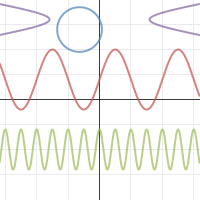
I was hoping students could use this embedded code as the actual graphing tool right in the blog itself. Unfortunately you only get to see a graph I created. I guess the students could then click on this graph and this would link them to the actual Desmos website, where they could use the graphing software.
I was hoping students could use this embedded code as the actual graphing tool right in the blog itself. Unfortunately you only get to see a graph I created. I guess the students could then click on this graph and this would link them to the actual Desmos website, where they could use the graphing software.
Saturday, 1 June 2013
BITSTRIPS - My Avatar
Here is the avatar I created for myself.
This site is so addictive. I could play with this for hours. I can only imagine how much the students would be in to something like this. A great technology assisted learning experience. I can think of many math related activities that could incorporate Bitstrips, for example the students could visually explaining how to measure the height of a flag pole, or tree etc., using a clinometer.
This site is so addictive. I could play with this for hours. I can only imagine how much the students would be in to something like this. A great technology assisted learning experience. I can think of many math related activities that could incorporate Bitstrips, for example the students could visually explaining how to measure the height of a flag pole, or tree etc., using a clinometer.
Fourth Week of Class
QR Codes
QR Codes are a two dimensional barcode that is optically readable by a smartphone camera with the appropriate app. The barcode optically links the user to a web site. Here are some QR Codes to some of my favourite websites:

1) I enjoy following this blog to keep up to date
on the global economic situation from various
"experts".

2) This is a must for any math teacher.

3) This QR code will reveal my passion.

4) I love to learn new things and I am a visual
learner, and so this website, as you know, is
great for any topic you like.

5) No list of favourite sites is complete without
the most important website on the internet.
Some people might even recognize it from
it's QR code. Wow you're good!
I'm not going to tell you what websites are in this list. That would take all the fun out of it. If you are curious you can go and check them out. You'll need an App for that.
QR Codes are a two dimensional barcode that is optically readable by a smartphone camera with the appropriate app. The barcode optically links the user to a web site. Here are some QR Codes to some of my favourite websites:
1) I enjoy following this blog to keep up to date
on the global economic situation from various
"experts".
2) This is a must for any math teacher.
3) This QR code will reveal my passion.

4) I love to learn new things and I am a visual
learner, and so this website, as you know, is
great for any topic you like.
5) No list of favourite sites is complete without
the most important website on the internet.
Some people might even recognize it from
it's QR code. Wow you're good!
I'm not going to tell you what websites are in this list. That would take all the fun out of it. If you are curious you can go and check them out. You'll need an App for that.
Tuesday, 21 May 2013
Third Week of Class
This week we were introduce to an excellent teacher resource called Edcanvas. Basically Edcanvas is a website that allows for interactive presentation of live websites that can be accessed and played right in the Edcanvas presentation. The projects are PUBLIC , anyone can access it even without an account. Better than PowerPoint! You can even embed PowerPoints within a presentation. Here is a short Edcanvas presentation I made on the Applications of Trigonometric Functions.
Thursday, 16 May 2013
My Son's First Video Upload onto YouTube
My son, who is 9 years old has shown a lot of interest in making Stop Motion videos with plasticine figurines or Lego characters. He still has some learning to do, like ensuring the video isn't presented vertically. The video that you see here is a bit on the gory side, but it did require a lot of patience and imagination. Enjoy.
WARNING THE CONTENTS OF THIS VIDEO MIGHT NOT BE SUITABLE FOR YOUNG VIEWERS. VIEWER DISCRETION IS ADVISED.
WARNING THE CONTENTS OF THIS VIDEO MIGHT NOT BE SUITABLE FOR YOUNG VIEWERS. VIEWER DISCRETION IS ADVISED.
Sunday, 12 May 2013
Second Week of Class
During our second week of class we set up a G-mail account.
 This will be our mode of communication throughout the course.
We talked about cloud storage which is where data can be stored not in the user's computer, but in a virtual storage online in a site called Dropbox. Dropbox will be used to crate a class folder for submitting assignments or retrieving files placed there by Mario. Files placed in this folder are accessible from any computer, tablet or smart phone provided there is a Wifi connection. I feel this image does a great job describing the concept of cloud storage for the Dropbox brand.
 I discovered that Dropbox was created by two MIT students, Drew Houston and Arash Ferdowsi in 2007.
Here is the link to both sites mentioned in this blog entry: Gmail and Dropbox
We talked about cloud storage which is where data can be stored not in the user's computer, but in a virtual storage online in a site called Dropbox. Dropbox will be used to crate a class folder for submitting assignments or retrieving files placed there by Mario. Files placed in this folder are accessible from any computer, tablet or smart phone provided there is a Wifi connection. I feel this image does a great job describing the concept of cloud storage for the Dropbox brand.

Here is the link to both sites mentioned in this blog entry: Gmail and Dropbox
Saturday, 4 May 2013
First Week of Class

We began with a discussion of the 4 C's of Critical Thinking:
1. Collaboration
2. Communication
3. Creativity
4. Critical Thinking
Technology
Throughout the course we would be introduced to various web-based tools such as:
- Gmail
- Edcanvas
- Dropbox
- Symbaloo
- Edugains
- Photostory
- You Tube
- Easel-ly
...and many others.
For each blog entry I will highlight one of these web-based tools. Starting with Twitter.
Twitter an online social networking service and microblogging service that enables its users to send and read text-based messages of up to 140 characters. Here's the link: Twitter


Tuesday, 30 April 2013
Tuesday, 23 April 2013
Welcome To My Blog
Testing a link for You Tube
You Tube - Evian Video

Testing an Embedded code for my Symbaloo webmix:
You Tube - Evian Video
A photo of my son in the Rocky Mountains during the summer of 2011.

Testing an Embedded code for my Symbaloo webmix:
Subscribe to:
Posts (Atom)